LogoAJCloud Docs
LogoAJCloud Docs
HomepageDocumentation
FAQs
User Manual
Camera Guide Manual
Download & Register the ApplicationCamera IntroductionSet up the Camera — Plan A (Bluetooth)Set up the Camera — Plan B (Soft-AP)Test the Signal and All Set-upInstall the CameraIntroduction to Basic FunctionsFAQWarranty Activation
Quick Installation Guide
User ManualCamera Guide Manual

Install the Camera

Mounting height, angle, and placement tips for the best motion detection performance.
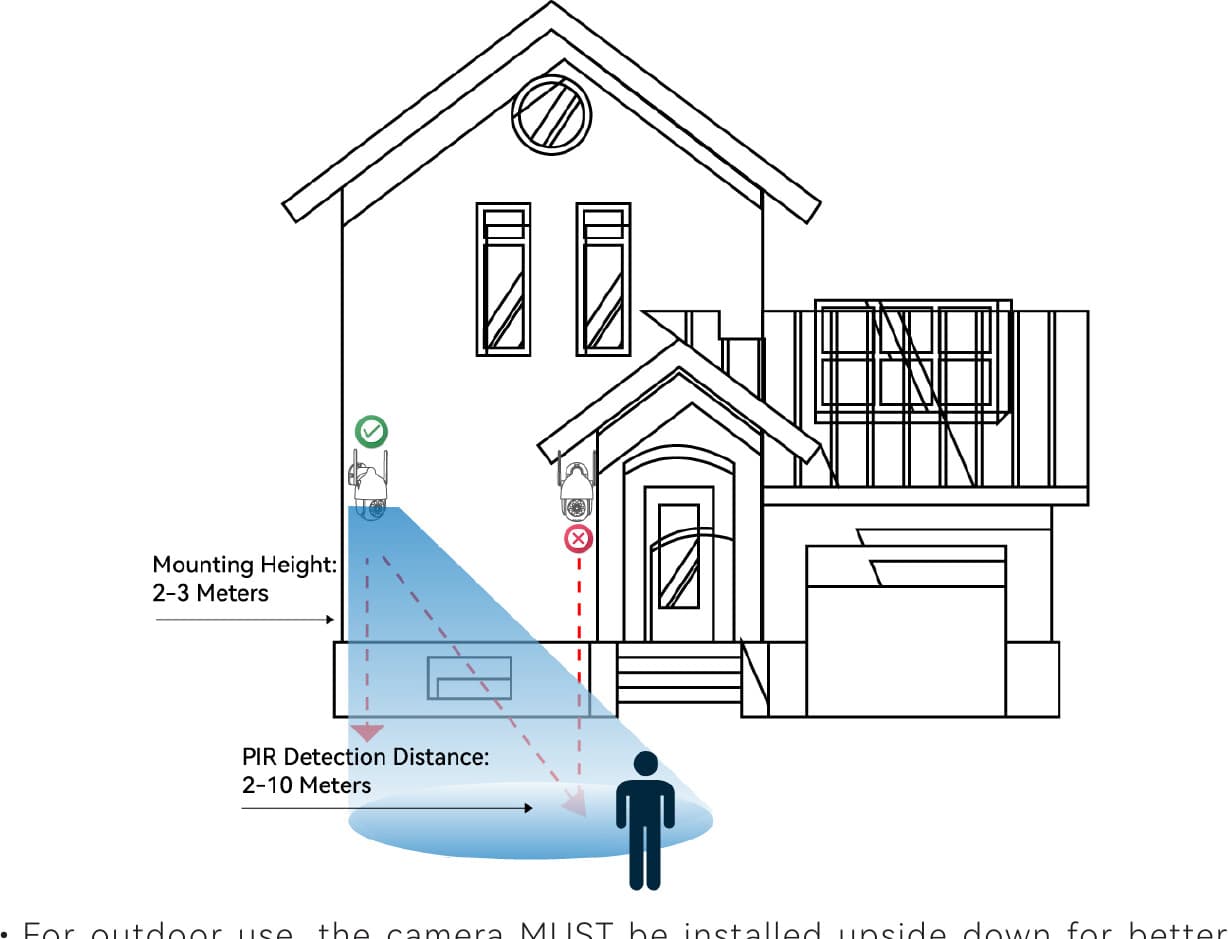
Recommended installation: mounting height of 2–3 meters and a PIR detection distance of 2–10 meters

  • For outdoor use, the camera must be installed upside down for better waterproof performance and better PIR motion sensor efficiency.
  • Install the camera 2–3 meters (7–10 ft) above the ground. This height maximizes the detection range of the PIR motion sensor.
  • For better motion detection performance, install the camera at an angle.

If a moving object approaches the PIR sensor vertically, the camera may fail to detect motion.

Test the Signal and All Set-up

Name your camera, finish setup, and check the Wi-Fi signal strength at its location.

Introduction to Basic Functions

Enable intelligent tracking, adjust motion detection sensitivity, and set alarm notifications.