LogoAJCloud Docs
LogoAJCloud Docs
HomepageDocumentation
FAQs
User Manual
Camera Guide Manual
Download & Register the ApplicationCamera IntroductionSet up the Camera — Plan A (Bluetooth)Set up the Camera — Plan B (Soft-AP)Test the Signal and All Set-upInstall the CameraIntroduction to Basic FunctionsFAQWarranty Activation
Quick Installation Guide
User ManualCamera Guide Manual

Test the Signal and All Set-up

Name your camera, finish setup, and check the Wi-Fi signal strength at its location.

Once the camera pairs successfully, give it a name — choose a preset location such as Front door, Back yard, or Living room, or enter your own — then tap OK to finish setup.

The app then shows the Wi-Fi signal strength at the camera's current location.
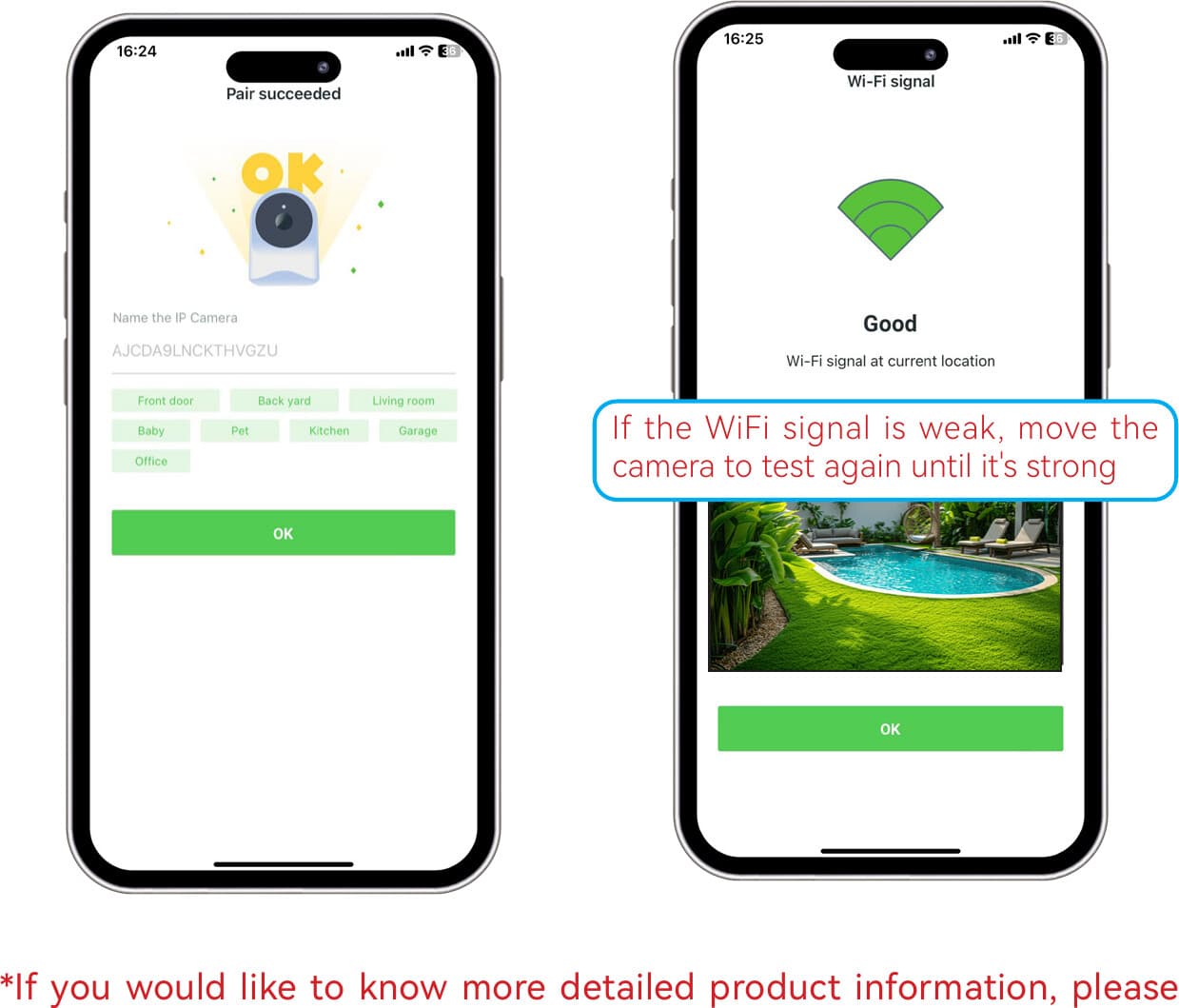
Pairing succeeded, name the camera, and check the Wi-Fi signal strength

If the Wi-Fi signal is weak, move the camera and test again until the signal is strong.

For more detailed product information, browse the rest of the User Manual.

Set up the Camera — Plan B (Soft-AP)

Connect your camera to Wi-Fi using its own hotspot (Soft-AP) connection.

Install the Camera

Mounting height, angle, and placement tips for the best motion detection performance.