LogoΤεκμηρίωση AJCloud
Αρχική σελίδαΤεκμηρίωση
Συχνές Ερωτήσεις
Πρόσβαση και Διαχείριση Λογαριασμού
Χρήση της Κάμερας
Πόσες κάμερες μπορώ να συσχετίσω με τον λογαριασμό μου;How Do I Update My Camera Firmware Version?Πώς αλλάζω τον κωδικό Wi-Fi της κάμεράς μου;Η κάμερα δεν έχει φωςΤι γίνεται αν η κάμερα δεν βρίσκεται σε λειτουργία ρύθμισης δικτύου;Μπορώ να χρησιμοποιήσω κάρτα SD με την κάμερά μου;
Ανίχνευση Κίνησης και Ειδοποίηση Συναγερμού
Αποθήκευση και Εγγραφή
Άλλες Ρυθμίσεις Κάμερας
Επίλυση Προβλημάτων
Συνδρομή
Υπηρεσίες Cloud
Ζητήματα Κόστους
Εγχειρίδιο Χρήστη
Συχνές ΕρωτήσειςΧρήση της Κάμερας

How Do I Update My Camera Firmware Version?

Learn how to check the firmware version and update the camera firmware in the AJCloud app

If the camera has a new firmware version available, a red dot will appear on the camera settings button to remind you that an update is available. You can update the camera firmware by following the steps below.

Find the camera you need to update in the APP, click Settings (Gear Button) -> Camera Info -> Firmware Version. The firmware version will be checked and upgraded automatically when you click it.
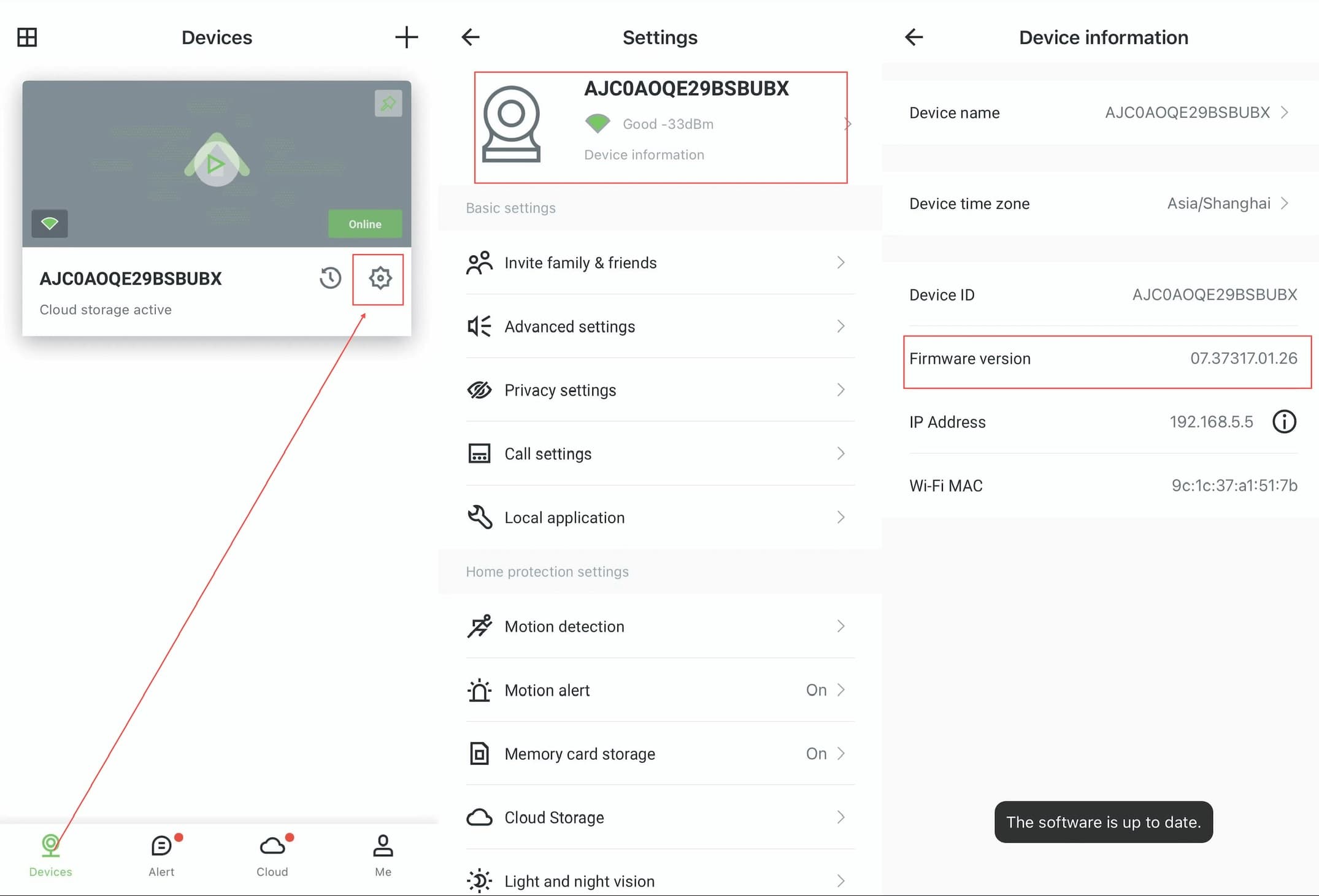
AJCloud App - Steps to check and update firmware version: Devices page → Settings → Device Information

Please make sure the camera is properly connected and the network is in good condition when upgrading. It may take some time to wait for the upgrade to be successful, do not disconnect the camera from the network and power supply during the upgrade process.

Πόσες κάμερες μπορώ να συσχετίσω με τον λογαριασμό μου;

Μάθετε σχετικά με το όριο καμερών ανά λογαριασμό στην εφαρμογή AJCloud

Πώς αλλάζω τον κωδικό Wi-Fi της κάμεράς μου;

Μάθετε πώς να αλλάξετε τη διαμόρφωση δικτύου Wi-Fi της κάμεράς σας στην εφαρμογή AJCloud