Logoเอกสาร AJCloud
Logoเอกสาร AJCloud
หน้าแรกเอกสาร
คำถามที่พบบ่อย
การเข้าถึงและจัดการบัญชี
การใช้งานกล้อง
บัญชีของฉันสามารถเชื่อมต่อกล้องได้กี่ตัว?How Do I Update My Camera Firmware Version?How Do I Change the Wi-Fi Password for My Camera?กล้องไม่มีไฟสถานะจะทำอย่างไรหากกล้องไม่อยู่ในโหมดตั้งค่าเครือข่าย?ฉันสามารถใช้การ์ด SD กับกล้องของฉันได้หรือไม่?
การตรวจจับความเคลื่อนไหวและการแจ้งเตือน
การจัดเก็บและบันทึก
การตั้งค่ากล้องอื่นๆ
การแก้ไขปัญหา
การสมัครสมาชิก
บริการคลาวด์
ปัญหาเกี่ยวกับค่าใช้จ่าย
คู่มือการใช้งาน
คำถามที่พบบ่อยการใช้งานกล้อง

How Do I Change the Wi-Fi Password for My Camera?

Learn how to change the Wi-Fi network configuration for your camera in the AJCloud app

Find the corresponding camera in the APP, click Settings (gear button) -> Network -> select setup mode -> select the network name you changed and enter the password to configure the network.
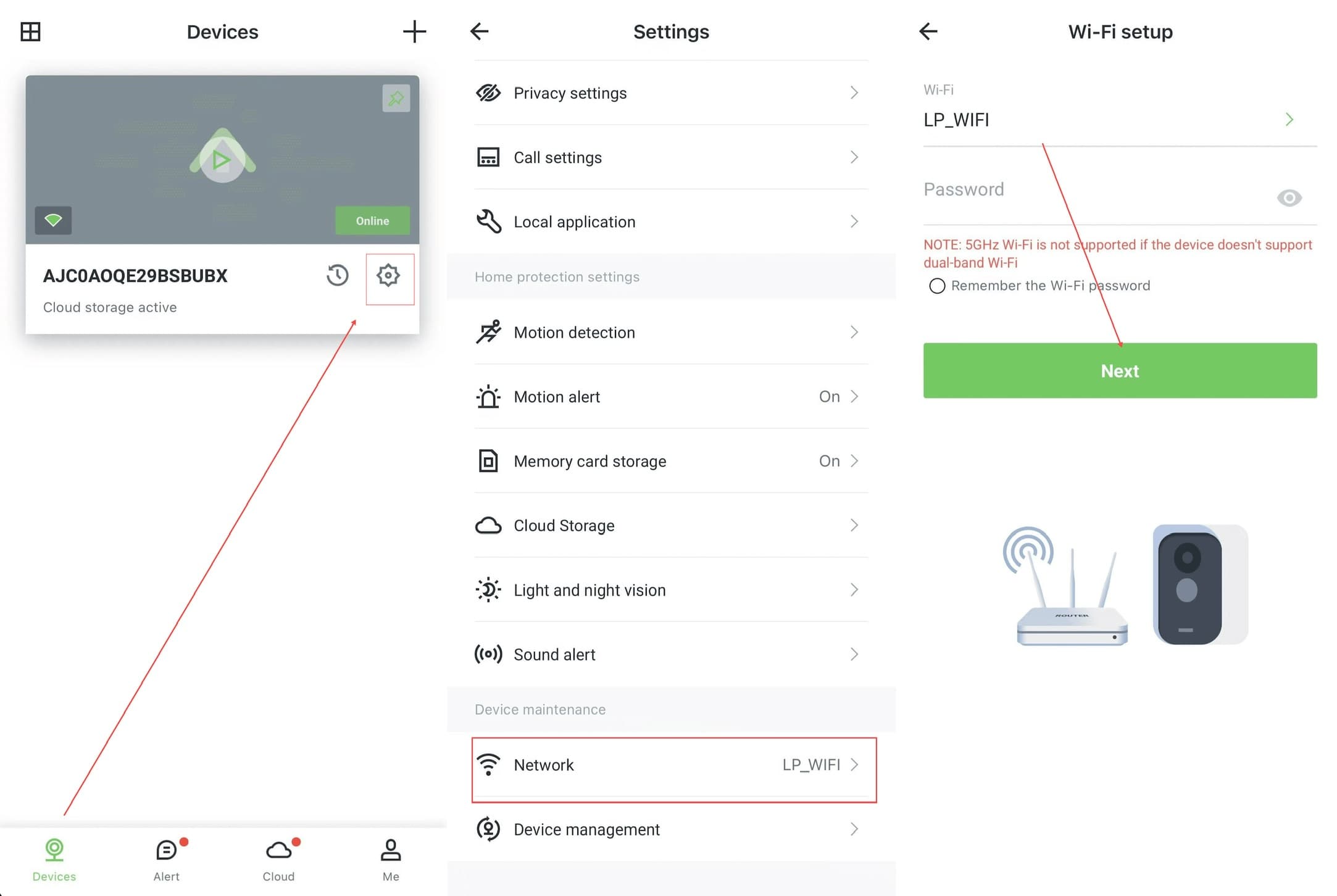
AJCloud App - Steps to change Wi-Fi password: Devices page → Settings → Network → Wi-Fi setup

If the camera never enters the network configuration status or fails to configure the network, please hold the Reset button until you hear a beep to indicate that the camera has been successfully reset. At this point you can try configuring the network for the camera again.

5GHz Wi-Fi is not supported if the device doesn't support dual-band Wi-Fi. Please make sure you are connecting to a 2.4GHz network.

How Do I Update My Camera Firmware Version?

Learn how to check the firmware version and update the camera firmware in the AJCloud app

กล้องไม่มีไฟสถานะ

สิ่งที่ควรทำเมื่อกล้องไม่มีไฟแสดงสถานะ