LogoTài liệu AJCloud
Trang chủTài liệu
Câu Hỏi Thường Gặp
Truy Cập và Quản Lý Tài Khoản
Sử Dụng Camera
Tài khoản của tôi có thể liên kết bao nhiêu camera?How Do I Update My Camera Firmware Version?How Do I Change the Wi-Fi Password for My Camera?Camera không có đènPhải làm gì nếu camera không ở chế độ cài đặt mạng?Tôi có thể sử dụng thẻ SD với camera của mình không?
Phát Hiện Chuyển Động và Thông Báo Cảnh Báo
Lưu Trữ và Ghi Hình
Cài Đặt Khác Của Camera
Khắc Phục Sự Cố
Đăng Ký
Dịch Vụ Đám Mây
Vấn Đề Liên Quan Đến Chi Phí
Hướng dẫn sử dụng
Câu Hỏi Thường GặpSử Dụng Camera

How Do I Update My Camera Firmware Version?

Learn how to check the firmware version and update the camera firmware in the AJCloud app

If the camera has a new firmware version available, a red dot will appear on the camera settings button to remind you that an update is available. You can update the camera firmware by following the steps below.

Find the camera you need to update in the APP, click Settings (Gear Button) -> Camera Info -> Firmware Version. The firmware version will be checked and upgraded automatically when you click it.
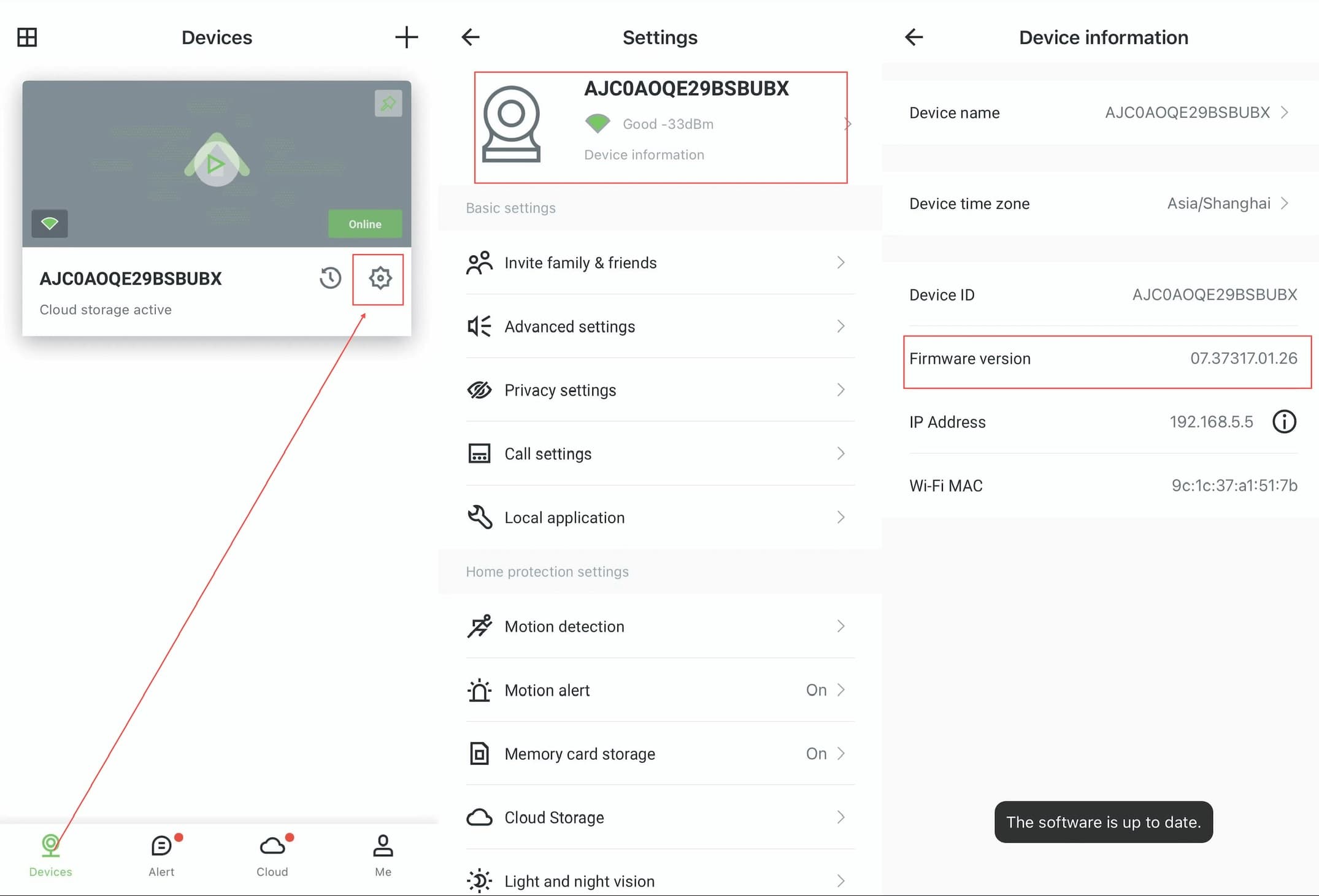
AJCloud App - Steps to check and update firmware version: Devices page → Settings → Device Information

Please make sure the camera is properly connected and the network is in good condition when upgrading. It may take some time to wait for the upgrade to be successful, do not disconnect the camera from the network and power supply during the upgrade process.

Tài khoản của tôi có thể liên kết bao nhiêu camera?

Tìm hiểu về giới hạn camera trên mỗi tài khoản trong ứng dụng AJCloud

How Do I Change the Wi-Fi Password for My Camera?

Learn how to change the Wi-Fi network configuration for your camera in the AJCloud app