LogoDokumentasi AJCloud
BerandaDokumentasi
Pertanyaan Umum
Akses dan Manajemen Akun
Penggunaan Kamera
Berapa banyak kamera yang bisa dikaitkan dengan akun saya?How Do I Update My Camera Firmware Version?How Do I Change the Wi-Fi Password for My Camera?Kamera tidak memiliki lampuBagaimana jika kamera tidak dalam mode pengaturan jaringan?Bisakah saya menggunakan kartu SD dengan kamera saya?
Deteksi Gerakan dan Notifikasi Alarm
Penyimpanan dan Perekaman
Pengaturan Kamera Lainnya
Penyelesaian Masalah
Langganan
Layanan Cloud
Masalah Terkait Biaya
Panduan Pengguna
Pertanyaan UmumPenggunaan Kamera

How Do I Change the Wi-Fi Password for My Camera?

Learn how to change the Wi-Fi network configuration for your camera in the AJCloud app

Find the corresponding camera in the APP, click Settings (gear button) -> Network -> select setup mode -> select the network name you changed and enter the password to configure the network.
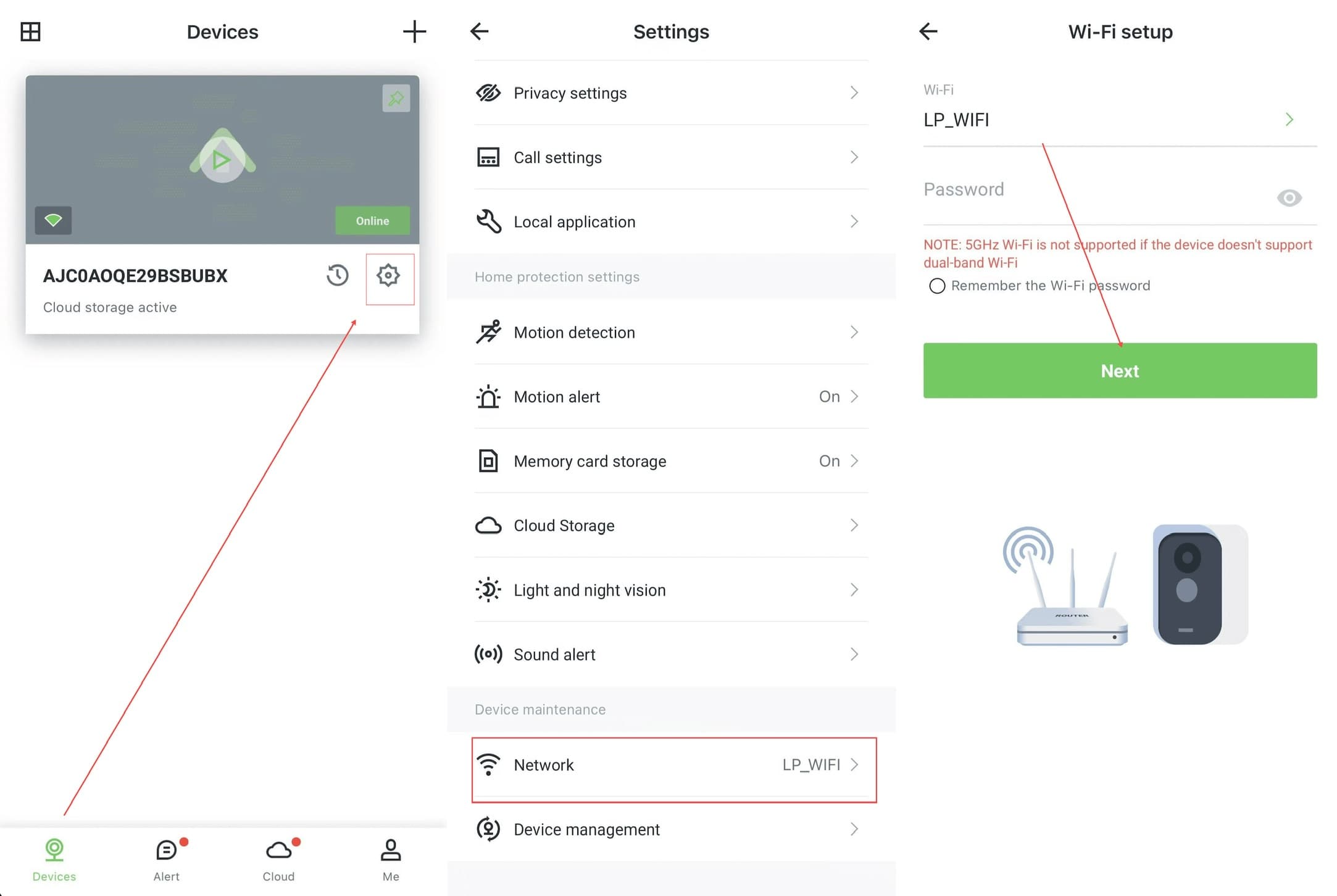
AJCloud App - Steps to change Wi-Fi password: Devices page → Settings → Network → Wi-Fi setup

If the camera never enters the network configuration status or fails to configure the network, please hold the Reset button until you hear a beep to indicate that the camera has been successfully reset. At this point you can try configuring the network for the camera again.

5GHz Wi-Fi is not supported if the device doesn't support dual-band Wi-Fi. Please make sure you are connecting to a 2.4GHz network.

How Do I Update My Camera Firmware Version?

Learn how to check the firmware version and update the camera firmware in the AJCloud app

Kamera tidak memiliki lampu

Apa yang harus dilakukan ketika kamera tidak memiliki indikator lampu