LogoDokumentasi AJCloud
BerandaDokumentasi
Pertanyaan Umum
Akses dan Manajemen Akun
Penggunaan Kamera
Berapa banyak kamera yang bisa dikaitkan dengan akun saya?How Do I Update My Camera Firmware Version?How Do I Change the Wi-Fi Password for My Camera?Kamera tidak memiliki lampuBagaimana jika kamera tidak dalam mode pengaturan jaringan?Bisakah saya menggunakan kartu SD dengan kamera saya?
Deteksi Gerakan dan Notifikasi Alarm
Penyimpanan dan Perekaman
Pengaturan Kamera Lainnya
Penyelesaian Masalah
Langganan
Layanan Cloud
Masalah Terkait Biaya
Panduan Pengguna
Pertanyaan UmumPenggunaan Kamera

How Do I Update My Camera Firmware Version?

Learn how to check the firmware version and update the camera firmware in the AJCloud app

If the camera has a new firmware version available, a red dot will appear on the camera settings button to remind you that an update is available. You can update the camera firmware by following the steps below.

Find the camera you need to update in the APP, click Settings (Gear Button) -> Camera Info -> Firmware Version. The firmware version will be checked and upgraded automatically when you click it.
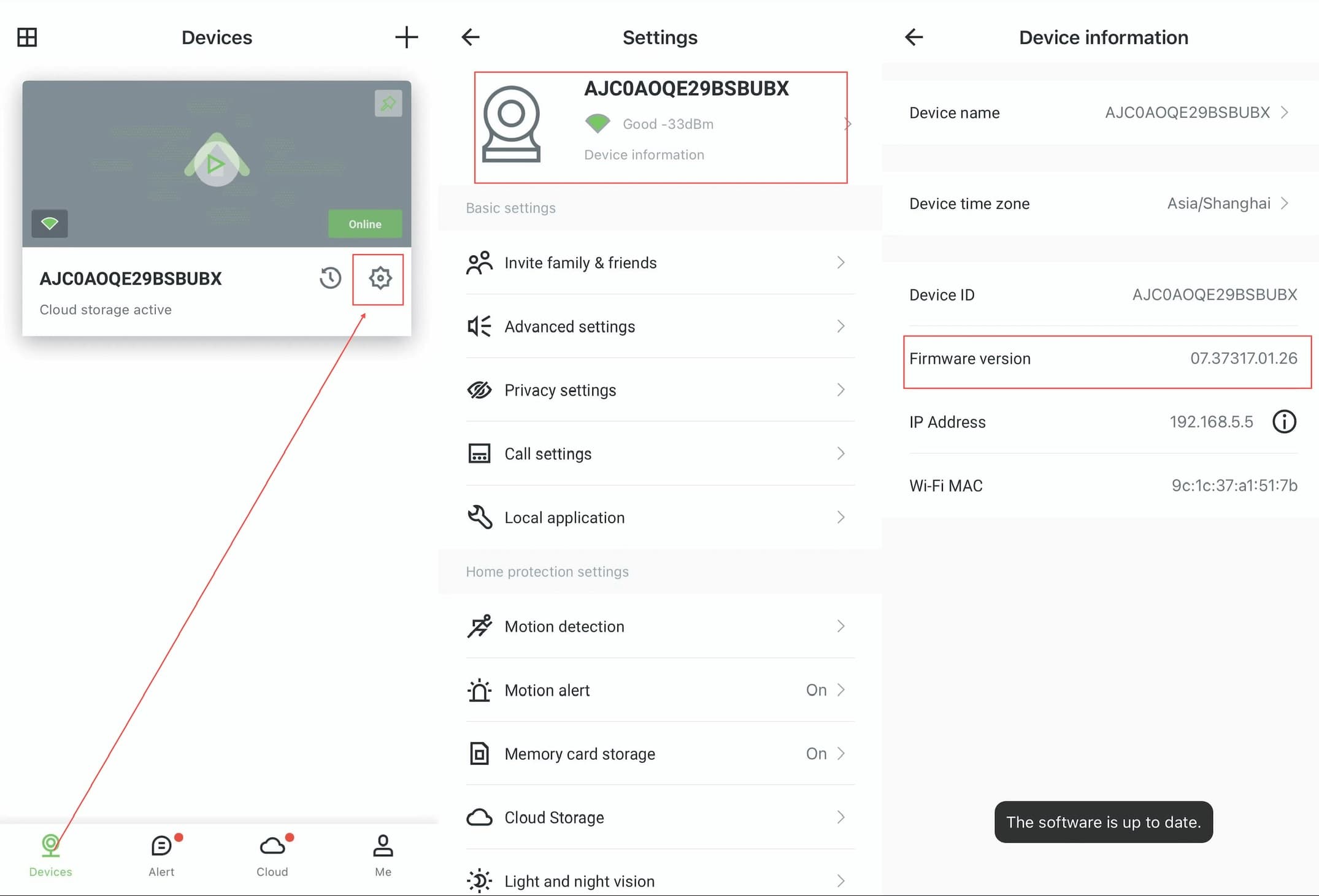
AJCloud App - Steps to check and update firmware version: Devices page → Settings → Device Information

Please make sure the camera is properly connected and the network is in good condition when upgrading. It may take some time to wait for the upgrade to be successful, do not disconnect the camera from the network and power supply during the upgrade process.

Berapa banyak kamera yang bisa dikaitkan dengan akun saya?

Pelajari tentang batas kamera per akun di aplikasi AJCloud

How Do I Change the Wi-Fi Password for My Camera?

Learn how to change the Wi-Fi network configuration for your camera in the AJCloud app