LogoДокументация AJCloud
ГлавнаяДокументация
Часто Задаваемые Вопросы
Доступ и Управление Аккаунтом
Использование Камеры
Сколько камер можно привязать к моему аккаунту?How Do I Update My Camera Firmware Version?How Do I Change the Wi-Fi Password for My Camera?На камере не горит индикаторЧто делать, если камера не находится в режиме сетевой настройки?Можно ли использовать SD-карту с моей камерой?
Обнаружение Движения и Уведомления
Хранение и Запись
Другие Настройки Камеры
Устранение Неисправностей
Подписка
Облачные Сервисы
Вопросы о Стоимости
Руководство пользователя
Часто Задаваемые ВопросыИспользование Камеры

How Do I Change the Wi-Fi Password for My Camera?

Learn how to change the Wi-Fi network configuration for your camera in the AJCloud app

Find the corresponding camera in the APP, click Settings (gear button) -> Network -> select setup mode -> select the network name you changed and enter the password to configure the network.
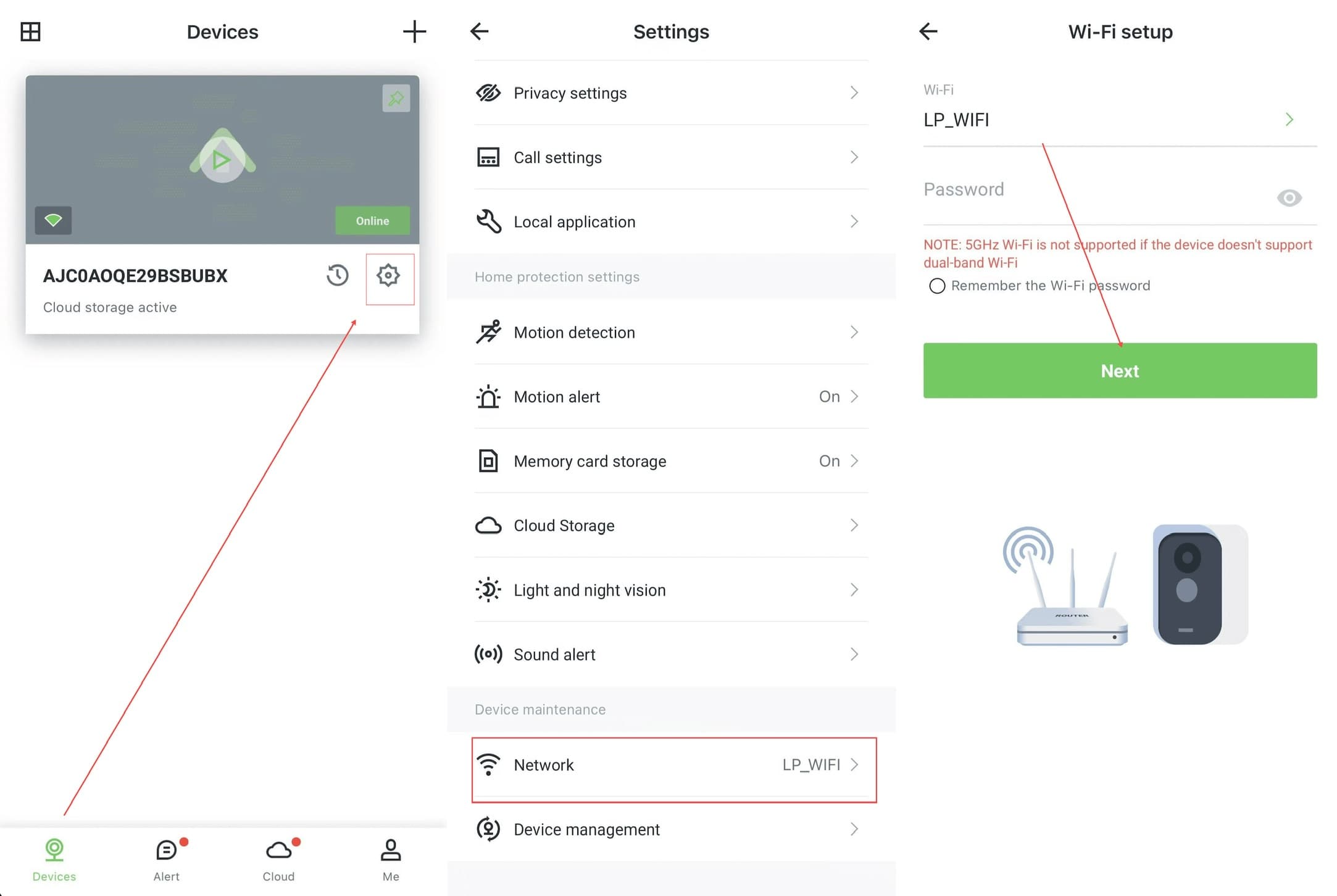
AJCloud App - Steps to change Wi-Fi password: Devices page → Settings → Network → Wi-Fi setup

If the camera never enters the network configuration status or fails to configure the network, please hold the Reset button until you hear a beep to indicate that the camera has been successfully reset. At this point you can try configuring the network for the camera again.

5GHz Wi-Fi is not supported if the device doesn't support dual-band Wi-Fi. Please make sure you are connecting to a 2.4GHz network.

How Do I Update My Camera Firmware Version?

Learn how to check the firmware version and update the camera firmware in the AJCloud app

На камере не горит индикатор

Что делать, если на камере нет светового индикатора